What this proves
Canvas state, pointer input, undo/redo, import/export, and no-build UI.
Frontend tooling case study
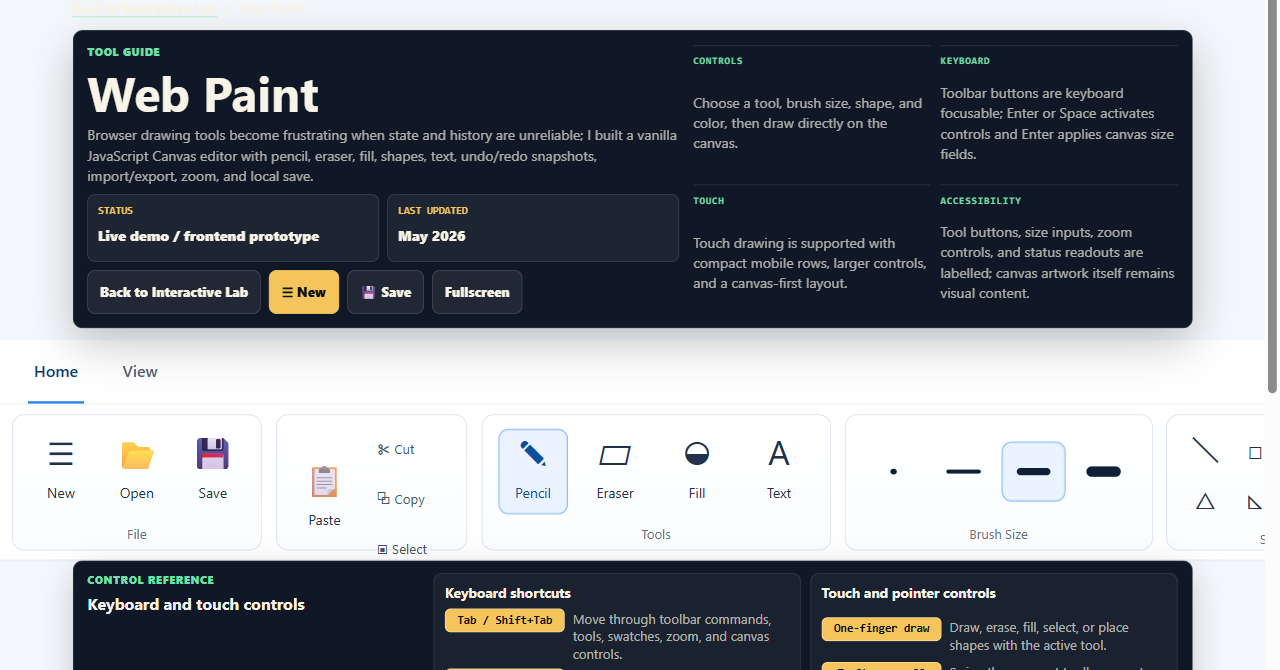
No-build Canvas editor with pencil, eraser, fill, shapes, text, selection, undo/redo, PNG import/export, local save, zoom, fullscreen, and responsive controls.

Quick summary
Frontend state, Canvas tools, browser interaction, and static app polish.
Canvas state, pointer input, undo/redo, import/export, and no-build UI.
Canvas tools, pointer capture, tool/color/brush state, capped history, flood fill, file validation, PNG export, localStorage, and mobile controls.
Open the tool, then scan state, history, import/export, input, and testing.
No layers, autosave recovery, full shortcuts, pixel regression tests, memory-aware history, or semantic canvas model.
Try this demo
Runs in the browser. These steps exercise state, pointer input, history, files, and responsive controls.
Visual proof
The screenshot is the live browser UI: toolbar, canvas, status bar, and guide.
Project links
The live page runs as HTML/CSS/JavaScript on GitHub Pages. Source links point to canvas logic and UI files.
TL;DR
01 / Project summary
Web Paint uses Canvas 2D, vanilla JavaScript state, pointer events, flood fill, capped history, PNG import/export, localStorage, resizing, zoom, and responsive controls.
Canvas tools must coordinate pixels, tool state, pointer input, history, imports, exports, zoom, and resizing.
No framework or backend; browser APIs handle files, storage, clipboard, and fullscreen.
I used vanilla JS state, Canvas paths, pointer capture, typed-array flood fill, and capped snapshots.
ImageData history is simple, but memory-heavy on large canvases.
Next: command/dirty-region history, workers, selection movement, shortcuts, and nonvisual output.
Why this matters
Drawing tasks need predictable tools, undo/redo, import, export, zoom, and mobile controls.
Canvas 2D, pointer events, bounded history, and browser file/clipboard/storage APIs avoid a backend.
Shows state modeling, DOM events, browser APIs, performance tradeoffs, mobile layout, and labels.
Production readiness
Working modes, pointer input, undo/redo, import/export, local save/load, zoom, resizing, status, and responsive panels.
History uses full snapshots. No semantic model, layers, document names, or full shortcuts.
Larger editor needs memory-aware history, autosave, selection movement, shortcuts, workers, tests, and nonvisual descriptions.
Drawings stay local. Cloud save would need validation, privacy controls, retention rules, upload limits, and abuse handling.
02 / What I built
Uses browser APIs: Canvas 2D, File, Clipboard, Fullscreen, object URLs, and LocalStorage. Logic/UI are vanilla JavaScript.
03 / Tool list
| Area | Tools | Implementation detail |
|---|---|---|
| Drawing | Pencil, brush, eraser, text, fill bucket. | Pointer events convert screen coordinates to canvas coordinates; brush settings map to stroke style. |
| Shapes | Line, rectangle, rounded rectangle, circle, triangle, right triangle, star, polygon. | Saved draft image previews drag geometry before commit. |
| Color and size | Palette swatches, active color preview, 2px, 6px, 12px, and 20px brush controls. | Buttons update shared state and active classes. |
| Canvas operations | New canvas, erase canvas, width/height controls, drag resize handle, zoom, fullscreen. | Dimensions clamp from 64 to 4096; resize preserves overlapping pixels and resets history. |
| File and clipboard | Open image, paste image/text, copy selection, cut selection, save PNG, local save. | File APIs, ClipboardItem, object URLs, blobs, LocalStorage, and PNG URLs power open, paste, copy, export, and save. |
04 / Canvas rendering model
pointerdown captures the pointer and start coordinate.
Pointer movement is throttled with requestAnimationFrame so high-frequency input stays fluid.
05 / Tool state management
activeTool and activeShape choose freehand, fill, text, selection, or shape preview.
Drawing fields separate live drag from committed canvas state.
Selection, zoom, and cached rectangles support overlays, clipboard, and scaled coordinates.
Canvas pixels are the image source of truth; JavaScript state describes the current interaction.
function setTool(tool) {
  if (tool !== "select") clearSelection();
  state.activeTool = tool;
  state.activeShape = "";
  toolStatus.textContent = `Tool: ${titleCase(tool)}`;
  syncActiveControls();
}
Bridge between DOM toolbar and canvas handlers.
06 / Undo and redo strategy
Undo/redo use ImageData snapshots and a history index. New edits discard redo states, save latest pixels, and cap history at 24 snapshots.
The model is simple but memory-heavy on large canvases. Production would use commands, dirty regions, compression, or workers.
function saveHistory() {
  state.history = state.history.slice(0, state.historyIndex + 1);
  state.history.push(context.getImageData(0, 0, canvas.width, canvas.height));
  if (state.history.length > maxHistory) state.history.shift();
  state.historyIndex = state.history.length - 1;
}

function restoreHistory(index) {
  const snapshot = state.history[index];
  if (!snapshot) return;
  context.putImageData(snapshot, 0, 0);
}
Simple snapshot model with a clear memory tradeoff.
07 / Import and export flow
localStorage.
08 / Keyboard, mouse, and touch
Pointer capture and canvas-space coordinates keep drag behavior stable.
touch-action: none prevents drawing gestures from becoming page scrolls.
Native buttons and inputs support keyboard use; richer shortcuts remain future work.
09 / Nonvisual limits and improvements
The interface uses semantic buttons, labels, focus states, ARIA labels, and toolbar groups. Canvas content remains visual pixel data.
Buttons and inputs focus, tool groups are labeled, swatches announce value, and selection/resize controls are named.
No semantic drawing model, full keyboard drawing commands, or inline text tool yet.
Add shortcuts, command palette, stronger status, high-contrast toolbar, and text descriptions.
10 / Performance considerations
Web Paint clamps canvases to 4096x4096, caps imports, uses typed-array flood fill, schedules resize previews with requestAnimationFrame, and limits history.
The main limit is full ImageData history. Production would add memory-aware limits, workers, region invalidation, import feedback, and low-memory mobile handling.
11 / Testing and QA notes
No automated suite yet. Manual checks cover tools, state transitions, import/export, and responsive controls.
Check tools, previews, undo/redo, reset, resize, zoom, fullscreen, import, paste, copy/cut, export, local save/load, and status.
Test mouse/keyboard, touch, tablet widths, high-DPI, clipboard, fullscreen, focus, and reduced motion.
Exercise invalid files, huge images, blocked clipboard, missing LocalStorage, canvas limits, mid-drag switches, empty selections, and history limits.
No regression tests yet for pixels, pointer sequences, memory pressure, cross-browser clipboard, or nonvisual canvas content.
12 / Deployment and run notes
Hosted on GitHub Pages at zacbatten.me/paint.html. HTML, CSS, and paint.js; no backend.
No env vars. Settings and local saves use browser state; imports stay in the active session.
No external drawing APIs. Uses Canvas 2D, Pointer Events, File, Clipboard, Fullscreen, object URLs, and LocalStorage.
Run python -m http.server 8000, then open /paint.html. A local server avoids file:// quirks.
No uploads or secrets. Cloud save would need auth, upload validation, quotas, retention rules, and privacy controls.
13 / Screenshot
14 / What I would improve next